Troubleshoot 0x10E or 0xC1 Blue Screens in Windows 7/Vista (Historical)
Historical guidance for Windows 7/Vista crashes with VIDEO_MEMORY_MANAGEMENT_INTERNAL (0x10E) or SPECIAL_POOL_DETECTED_MEMORY_CORRUPTION (0xC1).
Historical support note: Windows 7 and Windows Vista are no longer supported by Microsoft.
The original article treated 0x0000010E and 0x000000C1 as closely related blue screens. They are different bug checks and should be diagnosed separately.
0x10E — VIDEO_MEMORY_MANAGEMENT_INTERNAL
Microsoft states that 0x10E means the video memory manager encountered a condition it could not recover from, and that the problem is usually caused by a video driver behaving improperly.
For a Windows 7 system:
- Install the display driver intended for the exact PC or graphics adapter.
- On systems with switchable/hybrid graphics, use the OEM-supported driver combination rather than mixing arbitrary Intel/AMD/NVIDIA packages.
- If the problem began immediately after a graphics-driver update, roll back to the previously stable OEM driver.
- Check the system manufacturer’s firmware and graphics-support notes.
0xC1 — SPECIAL_POOL_DETECTED_MEMORY_CORRUPTION
Microsoft defines 0xC1 as a driver writing to an invalid section of the special pool. It is therefore primarily a driver/debugging problem, not simply a sign that the PC needs more RAM.
If a recently installed driver or low-level utility preceded the crash, update or remove it and retest.
What about memory testing?
Faulty RAM can cause many forms of instability, so a memory diagnostic can still be useful when crashes are inconsistent or other symptoms point to hardware. However, simply adding more memory is not a supported generic repair for either 0x10E or 0xC1.
The old one-off hotfix links in the original article are not carried forward as universal fixes; a historical hotfix only applies to the exact symptoms and build documented by its KB article.
Official references
- Microsoft Bug Check 0x10E: https://learn.microsoft.com/en-us/windows-hardware/drivers/debugger/bug-check-0x10e---video-memory-management-internal
- Microsoft Bug Check 0xC1: https://learn.microsoft.com/en-us/windows-hardware/drivers/debugger/bug-check-0xc1--special-pool-detected-memory-corruption
- Microsoft Windows lifecycle status: https://support.microsoft.com/en-us/windows/deployment/updates-lifecycle/what-does-it-mean-if-windows-isn-t-supported
Related posts
Browse all articles →
Fix PAGE_FAULT_IN_NONPAGED_AREA (0x50) in Windows 7/Vista/XP (Historical)
Historical troubleshooting for PAGE_FAULT_IN_NONPAGED_AREA (0x50), focusing on faulty drivers/services, antivirus software, NTFS corruption, and failing memory or hardware.
Fix Windows Setup Error 0x80FE0000 or 0x80FF0000 in Windows 7/Vista (Historical)
Historical troubleshooting for Windows Setup errors 0x80FE0000/0x80FF0000 and 'could not set the offline locale information,' with destructive disk steps removed from the default workflow.
Troubleshoot Stop 0x9F or 0xFE on AMD-Based Windows 7/Vista PCs (Historical)
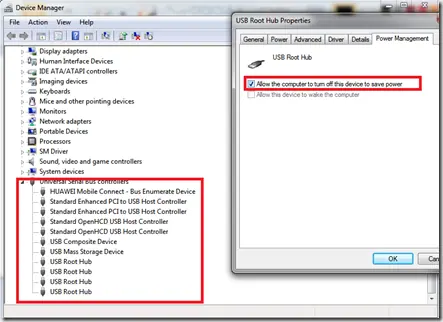
Historical troubleshooting for Windows 7/Vista systems that crash with 0x9F or 0xFE around sleep or USB activity, with the two bug checks correctly separated.