Fix Windows 10 Activation Error 0xC004F050
Troubleshoot Windows 10 activation error 0xC004F050 by checking the edition, product key, digital license, and Activation troubleshooter.
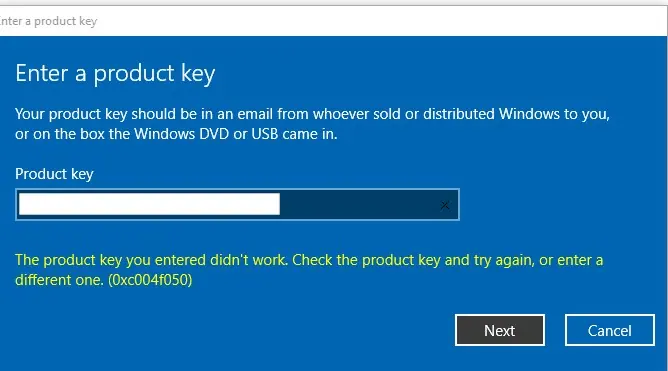
Windows activation error 0xC004F050 means Windows rejected the product key or could not use it for the installed edition or licensing state. The safest fix is to verify the license and edition before changing licensing files or services.
Windows 10 support note: Windows 10 reached end of normal support on October 14, 2025. Activation can still determine whether the installation is licensed, but activation does not restore normal operating-system support.
1. Check the installed Windows edition
Open Settings > System > About or run winver, then confirm whether the PC is running Windows 10 Home, Pro, Enterprise, or another edition.
A product key must match the edition it is intended to activate.
2. Run the Activation troubleshooter
Open:
Settings > Update & Security > Activation
If Troubleshoot is available, run it and follow the prompts. This is especially useful if the device previously had a digital license or if hardware was changed.
3. Re-enter a valid product key
On the Activation page, select Change product key and enter the 25-character key again.
Error 0xC004F050 can appear when:
- the key is invalid or blocked;
- the key belongs to a different Windows edition;
- the device was expected to activate with a digital license but the installed edition does not match that entitlement;
- significant hardware changes affected the device’s activation state.
4. Confirm internet connectivity and licensing source
For a retail or OEM key, confirm where the key came from and that it is intended for this device and edition. For work devices that use volume licensing or Key Management Service (KMS), contact the organization’s administrator.
Do not rename tokens.dat or rebuild the Software Protection repository as a routine first step. Those older workarounds can make licensing troubleshooting more complicated and are not necessary for the common 0xC004F050 cases documented by Microsoft.
Official references
- Windows 10 activation error 0xC004F050: https://support.microsoft.com/en-us/windows/windows-10-activation-error-0xc004f050-68e6850d-b0b7-fc3b-6776-36a62f47d3ea
- Windows activation errors: https://support.microsoft.com/en-us/windows/activation/get-help-with-windows-activation-errors
Related posts
Browse all articles →
Fix Windows Boot Error 0xc0000225 in Windows 10 or 8.1
Troubleshoot boot error 0xc0000225 with Startup Repair first, then repair Boot Configuration Data only when needed.
Fix Windows Update Error 0x80080008 in Windows 8 or 8.1 (Historical)
Historical Windows 8/8.1 troubleshooting for update error 0x80080008, with unsupported-OS context and safer repair steps.
How to Use Point-in-Time Restore in Windows 11
Point-in-Time Restore can roll Windows 11 back to a recent full-system snapshot, including apps, settings, and personal files.