Fix the Group Policy Namespace Error in Early Windows 10 Builds (Historical)
Historical fix for the Microsoft.Policies.Sensors.WindowsLocationProvider duplicate namespace error seen when early Windows 10 builds opened Group Policy Editor.
Historical article: This issue affected early Windows 10 builds, including the RTM-to-version-1511 upgrade path. It is not a general fix for modern Group Policy problems. Windows 10 reached end of normal support on October 14, 2025.
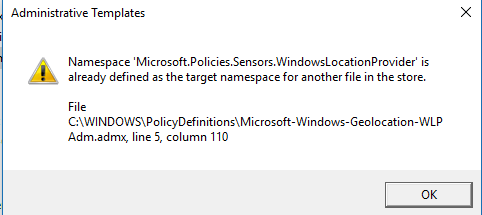
The error reads similar to:
Namespace
Microsoft.Policies.Sensors.WindowsLocationProvideris already defined as the target namespace for another file in the store.
Microsoft documented the cause: two ADMX files could define the same policy namespace after an early Windows 10 upgrade.
The safest first option
Microsoft notes that this message is informational in the documented scenario and that Group Policy settings can still work. If you do not need to clean up the old files, you can dismiss the message.
Local Windows 10 RTM-to-1511 workaround
For the local PolicyDefinitions store, Microsoft’s documented workaround is to retire the stale Microsoft-Windows-Geolocation-WLPAdm files. Do not delete all four geolocation ADMX/ADML files as the older version of this article suggested.
- Back up the affected files.
- Open Command Prompt as administrator.
- Take ownership of the stale ADMX and ADML files:
takeown /F "C:\Windows\PolicyDefinitions\Microsoft-Windows-Geolocation-WLPAdm.admx" /A
takeown /F "C:\Windows\PolicyDefinitions\en-US\Microsoft-Windows-Geolocation-WLPAdm.adml" /A- Grant the local Administrators group Full Control over those two files.
- Rename each stale file so that it ends in
.oldrather than leaving it active as an ADMX/ADML file. - Reopen
gpedit.msc.
If your Windows display language is not en-US, use the corresponding language folder rather than copying the en-US path blindly.
Domain Central Store scenario
The Microsoft article gives a different cleanup sequence for a domain Central Store. Administrators should follow that scenario-specific procedure rather than applying the local-PC steps to SYSVOL.
Official reference
Microsoft Learn KB 3077013: https://learn.microsoft.com/en-us/troubleshoot/windows-server/group-policy/microsoft-policies-sensors-windowslocationprovider-defined
Related posts
Browse all articles →
How to Configure Windows 10 Update Notifications with Group Policy
Use the Configure Automatic Updates policy in supported Windows 10 editions to notify before downloading updates instead of silently downloading them.

How to Batch Rename Files in Windows with PowerRename and PowerShell
Use Microsoft PowerToys PowerRename or PowerShell to preview and apply advanced bulk file-renaming rules in Windows 10 and 11.
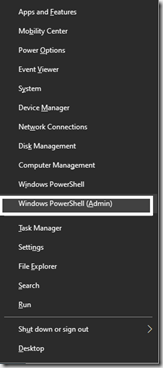
How to Replace PowerShell with Command Prompt in the Windows 10 Win+X Menu (Historical)
Historical Windows 10 instructions for switching the Win+X menu from Windows PowerShell to Command Prompt. This setting does not describe the current Windows 11 menu.