Windows Media Player Freezes in Full Screen on Windows Vista (Historical)
Historical troubleshooting for Windows Media Player full-screen freezes on Windows Vista, prioritizing graphics drivers, media-specific testing, and hardware diagnostics.
Historical support note: Windows Vista support ended in 2017. This article is retained for legacy systems only.
If Windows Media Player freezes only when video switches to full-screen mode, first determine whether the problem is tied to one media file/codec or to the graphics path used for full-screen playback.
1. Test more than one media file
Try several known-good local video files. If only one file fails, the file or codec is more likely to be the cause than Windows itself.
2. Check the display driver
Full-screen playback relies heavily on the graphics driver. Install the display driver recommended for the exact PC or graphics adapter and Windows Vista edition.
Do not use modern third-party driver-updater utilities to obtain legacy drivers.
3. Install the last applicable Windows/Vista updates available to that machine
The original article referenced an old Microsoft Fix it package. That automated tool is no longer a supported repair path and has been removed from this version.
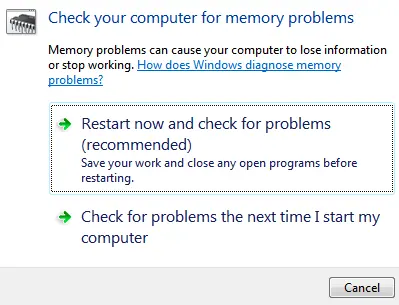
4. Check memory only if there are broader stability symptoms
If the machine also freezes or crashes outside Windows Media Player, run hardware diagnostics and a memory test. A full-screen WMP freeze by itself does not establish that RAM is faulty.
5. Avoid unrelated appearance tweaks
The old article suggested disabling Show shadows under menus. That setting changes a visual effect and is not a well-supported general solution for full-screen media freezes, so it is no longer recommended as a default fix.
Official references
- Microsoft Windows lifecycle status: https://support.microsoft.com/en-us/windows/deployment/updates-lifecycle/what-does-it-mean-if-windows-isn-t-supported
- Current Microsoft Windows Media Player troubleshooting (for supported Windows versions): https://support.microsoft.com/en-us/windows/apps/windowsmediaplayer/troubleshoot-windows-media-player-errors
Related posts
Browse all articles →
Fix Frequent 'Not Responding' Messages in Windows 7 and Vista — Historical Guide
Historical Windows 7/Vista troubleshooting for applications that frequently stop responding, with resource, disk, memory, driver, and system-file checks.
Fix Windows Setup Error 0x80FE0000 or 0x80FF0000 in Windows 7/Vista (Historical)
Historical troubleshooting for Windows Setup errors 0x80FE0000/0x80FF0000 and 'could not set the offline locale information,' with destructive disk steps removed from the default workflow.
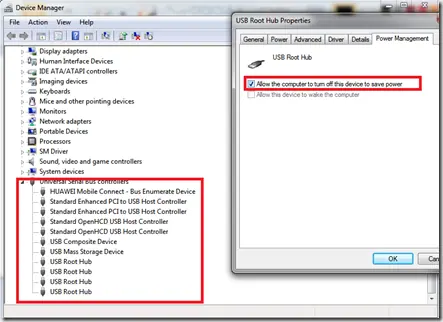
Troubleshoot Stop 0x9F or 0xFE on AMD-Based Windows 7/Vista PCs (Historical)
Historical troubleshooting for Windows 7/Vista systems that crash with 0x9F or 0xFE around sleep or USB activity, with the two bug checks correctly separated.