Troubleshoot Stop 0x9F or 0xFE on AMD-Based Windows 7/Vista PCs (Historical)
Historical troubleshooting for Windows 7/Vista systems that crash with 0x9F or 0xFE around sleep or USB activity, with the two bug checks correctly separated.
Historical support note: Windows Vista support ended in 2017 and Windows 7 support ended in 2020.
The original article grouped 0x0000009F and 0x000000FE together as an AMD EHCI problem. That is too broad. Microsoft defines these as two different bug checks:
- 0x9F — DRIVER_POWER_STATE_FAILURE: a driver is in an inconsistent or invalid power state.
- 0xFE — BUGCODE_USB_DRIVER: an error occurred in a USB driver.
An older AMD-based PC could encounter either code around standby, resume, or USB activity, but the code alone does not prove that the AMD chipset is the cause.
If the crash happens during sleep, resume, or shutdown
For 0x9F, concentrate on devices and drivers involved in power-state transitions:
- Note what changed before the crashes began: a new device, driver, firmware update, or power-management utility.
- Check Device Manager for devices reporting problems.
- Install the chipset, USB, storage, graphics, and other relevant drivers supplied for the exact PC or motherboard model.
- Check the PC manufacturer’s support page for BIOS/firmware updates that mention power, USB, sleep, or resume problems.
- Review the System event log around the time of the crash.
If the crash points to USB
For 0xFE, disconnect non-essential USB devices and test again. Then reconnect devices one at a time to isolate the trigger.
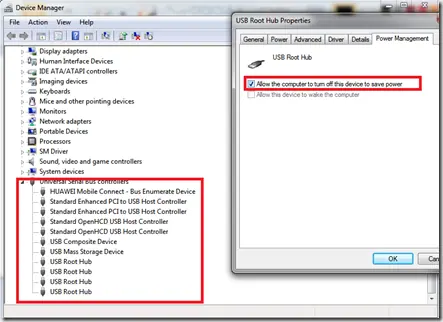
If one USB controller or hub is repeatedly implicated, updating the chipset/USB controller driver is preferable to disabling power management across every USB root hub.
The old Microsoft Fix it link referenced by the original article is no longer a supported troubleshooting path and has been removed.
About the USB power-management checkbox
On some legacy systems, temporarily clearing Allow the computer to turn off this device to save power for a specific USB hub can help confirm a suspend/resume interaction. Treat this as a diagnostic workaround, not a universal repair.
Official references
- Microsoft Bug Check 0x9F: https://learn.microsoft.com/en-us/windows-hardware/drivers/debugger/bug-check-0x9f--driver-power-state-failure
- Microsoft Bug Check 0xFE: https://learn.microsoft.com/en-us/windows-hardware/drivers/debugger/bug-check-0xfe--bugcode-usb-driver
- Microsoft Windows lifecycle status: https://support.microsoft.com/en-us/windows/deployment/updates-lifecycle/what-does-it-mean-if-windows-isn-t-supported
Related posts
Browse all articles →
Fix Windows Setup Error 0x80FE0000 or 0x80FF0000 in Windows 7/Vista (Historical)
Historical troubleshooting for Windows Setup errors 0x80FE0000/0x80FF0000 and 'could not set the offline locale information,' with destructive disk steps removed from the default workflow.

Fix DRIVER_POWER_STATE_FAILURE (0x9F) in Windows 8 or 7 (Historical)
Historical troubleshooting for DRIVER_POWER_STATE_FAILURE (0x9F) on Windows 8/7, focusing on the device, driver, firmware, or power transition responsible for the crash.
Troubleshoot 0x10E or 0xC1 Blue Screens in Windows 7/Vista (Historical)
Historical guidance for Windows 7/Vista crashes with VIDEO_MEMORY_MANAGEMENT_INTERNAL (0x10E) or SPECIAL_POOL_DETECTED_MEMORY_CORRUPTION (0xC1).