SysTools Hard Drive Data Recovery for Windows — 2014 Review (Historical)
An edited archive of a 2014 hands-on review of SysTools Hard Drive Data Recovery, with current product context separated from the original test results.
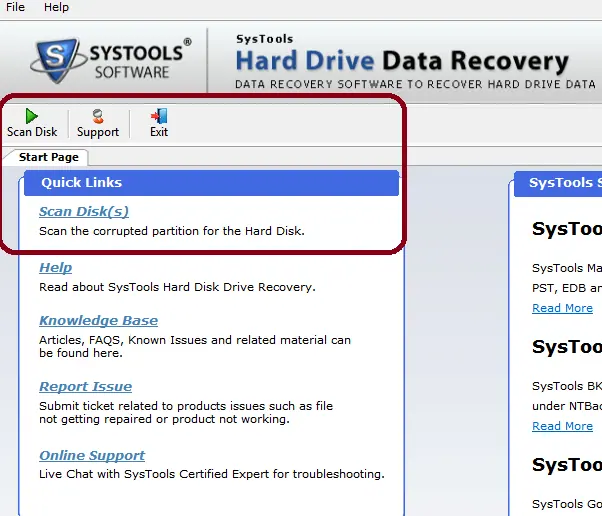
This is an edited archive of my 2014 review of SysTools Hard Drive Data Recovery for Windows. The software has changed substantially since then, so the original interface, version compatibility, timings, and rating should not be treated as a review of the current release.
What I tested in 2014
The original test environment included:
- A 16 GB USB flash drive formatted as FAT32, containing JPEG images.
- A 500 GB external hard drive using NTFS with multiple partitions.
- A formatted test partition and another partition from which files had been deleted.
The version tested at the time offered separate recovery modes for normal data, deleted files and folders, and formatted partitions. It could scan storage, display recoverable content, and save selected files to another location.
In that 2014 test, the workflow was straightforward: select the disk, choose the relevant recovery mode, scan, preview the recovered structure, and save the selected items.
What has changed since the original review
SysTools still sells a hard-drive recovery product, but the current vendor page describes a much newer release. The company currently lists support for Windows 11, Windows 10, Windows 8, and Windows 7, and describes recovery for NTFS, FAT16/FAT32, exFAT, formatted partitions, RAW partitions, and internal or external hard drives.
Those current specifications come from the vendor; they were not retested for this restored article.
Important data-recovery practice
When data is lost, minimize writes to the affected drive. Installing recovery software onto the same drive, copying new files to it, or repeatedly modifying its partitions can overwrite data you hope to recover.
Recover files to a different physical drive where possible. If the storage device is physically failing, making unusual noises, disconnecting, or contains irreplaceable data, professional recovery may be safer than repeated software scans.
Historical verdict
At the time of the original review, I rated the tested version 5/5 based on the workflow and the recovery scenarios I tried. That score belongs to the 2014 version and should not be read as a current rating.
Current vendor reference
SysTools Hard Drive Recovery: https://www.systoolsgroup.com/hard-drive-data-recovery.html
Related posts
Browse all articles →
Microsoft Introduced Its New Logo in 2012 — Historical Archive
Archive note on Microsoft introducing its four-color square logo and Segoe wordmark in August 2012, its first major corporate logo change since 1987.
How to Rebuild the BCD in Windows 10 or Windows 8.1
Repair Boot Configuration Data from Windows Recovery Environment, using Startup Repair first and Bootrec or BCDBoot only when needed.

Use DISM to Repair the Windows 8 or 8.1 Component Store (Historical)
Check and repair Windows 8/8.1 component-store corruption with DISM, then run System File Checker to repair protected system files.