Fix Windows Turning Transparent While Dragging or Resizing (Windows XP–8, Historical)
Historical troubleshooting for Windows XP through Windows 8 when window contents disappear or appear transparent while dragging or resizing.
Historical support note: Windows XP, Vista, 7, and 8 are all out of support. The behavior described here belongs to those legacy desktop interfaces.
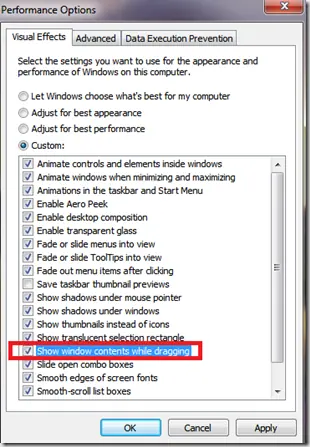
If a window shows only its outline—or its contents appear to disappear—while you drag or resize it, first check the Windows visual-effects setting that controls whether the contents are drawn during the move.
1. Check ‘Show window contents while dragging’
On the affected Windows versions, open the Performance Options dialog and look for:
Show window contents while dragging
Enable the option, apply the change, and test again.
If it is already enabled, toggle it off, apply, then enable it again. This can help distinguish a simple visual-setting problem from a graphics-driver issue.
2. Update the display driver
If the behavior is new or accompanied by flicker, corruption, or crashes:
- Identify the display adapter in Device Manager.
- Install the driver recommended by the PC or graphics-adapter manufacturer for the exact operating system.
- Restart and retest.
Avoid installing random legacy graphics packages from third-party driver sites.
3. Treat vendor-specific 3D settings as secondary
The original article included NVIDIA Control Panel settings as a general fix. Those settings vary by driver generation and are not a Windows-wide cause of transparent-window behavior.
Only change GPU control-panel options when you can reproduce the issue with a specific setting and can restore the previous configuration.
Official reference
- Microsoft Windows lifecycle status: https://support.microsoft.com/en-us/windows/deployment/updates-lifecycle/what-does-it-mean-if-windows-isn-t-supported
Related posts
Browse all articles →
Keyboard and Mouse Stop Working After Windows Sign-In (XP–8, Historical)
Safer legacy troubleshooting for a keyboard or mouse that works before Windows loads but stops responding at or after sign-in.
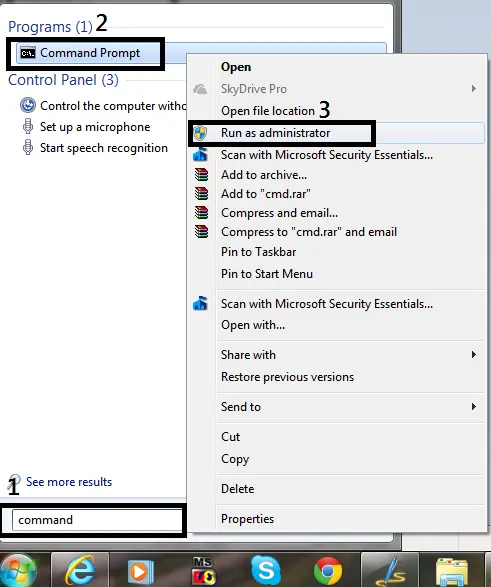
How to Open Command Prompt as Administrator in Windows 8, 7, and Vista (Historical)
Historical guide to opening an elevated Command Prompt in Windows 8, Windows 7, and Windows Vista.
Fix: Mouse or Touchpad Pointer Jumps While Typing in Windows 8, 7, Vista, or XP (Historical)
Historical troubleshooting for laptop touchpad cursor jumps, focusing on palm rejection, OEM drivers, sensitivity, charger interference, and hardware isolation.