Windows guides
How to Use Focus Sessions in Windows 11 for Productivity
Use Focus in Windows 11 to reduce distractions, start timed focus sessions, and connect the Clock app with Spotify and Microsoft To Do.
181 articles · Page 2
Use Focus in Windows 11 to reduce distractions, start timed focus sessions, and connect the Clock app with Spotify and Microsoft To Do.
Learn when Windows 11 can activate through a digital license without asking you to type a 25-character product key, and when a new license is still required.
Check Windows 11 compatibility with Microsoft PC Health Check and verify the key requirements, including TPM 2.0, UEFI, Secure Boot capability, RAM, storage, and CPU support.
Change your Windows desktop background to a picture, solid color, slideshow, or supported Windows Spotlight background, and adjust how images fit the screen.
Use Active Hours, restart scheduling, and pause controls in Windows 10 to reduce interruptions from Windows Update. Includes current end-of-support guidance.
Roll back a recently updated Windows driver through Device Manager, and learn what to do when the Roll Back Driver button is unavailable.
Use Microsoft PowerToys PowerRename or PowerShell to preview and apply advanced bulk file-renaming rules in Windows 10 and 11.
Troubleshoot Wi-Fi problems in Windows 10 and 11 with Microsoft's recommended sequence, from basic checks and reconnection to network commands, driver repair, and network reset.
Understand the Windows 11 TPM 2.0 requirement, what an unsupported installation means, and what to check before attempting any hardware-requirement workaround.
Allow a trusted app through Windows Firewall in Windows 10 or 11, understand private and public network profiles, and avoid opening unnecessary ports.
Control which supported Windows 10 apps can run in the background, reduce unnecessary activity, and understand which desktop apps are not affected by the Background apps privacy setting.
Install Windows Subsystem for Linux (WSL) on Windows 10 or 11, choose a Linux distribution, update WSL, and access Windows files from Linux.
Prepare a Windows PC for a Windows-and-Linux dual boot, protect your data, handle BitLocker correctly, and use the Linux installer’s supported alongside-Windows option when available.
Create a separate standard local account in Windows 11 for temporary users without enabling the built-in Guest account, which Microsoft recommends leaving disabled.
Quickly rename a group of files in Windows 10 or 11 with File Explorer, plus learn when Microsoft PowerRename is a better choice.
Use Windows 11 Settings or Task Manager to stop nonessential apps from launching when you sign in and identify high-impact startup items.
Check Windows activation status and activate Windows 10 or 11 with a digital license or valid product key. Includes current Windows 10 support context.
Create AI-generated images on a Windows 10 PC with Microsoft Designer in a web browser, write better prompts, and save the results without relying on Windows 11-only Paint features.
Find startup programs that do not appear in the normal Windows 11 Startup list by checking Startup folders and, for advanced troubleshooting, Microsoft Sysinternals Autoruns.
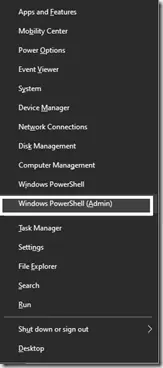
Historical Windows 10 instructions for switching the Win+X menu from Windows PowerShell to Command Prompt. This setting does not describe the current Windows 11 menu.